Chromebook Duet 3 2022 Review: Real User Experience After 3 Months
I've been using the Chromebook Duet 3 (2022) as my everyday carry for the last three months — taking it to coffee shops, using it on flights, and putting it through the small-but-steady workload of my daily writing, light photo edits, streaming, and occasional debugging sessions. I bought this as a compact, lightweight Chromebook that promised more than a basic tablet: a detachable keyboard, a pleasantly sharp display, and the convenience of ChromeOS. What I found was a mostly delightful small device with a few compromises that matter depending on how you plan to use it.
Why I picked the Duet 3 and what I wanted from it
I wanted something that felt more capable than a tablet but stayed ultra-portable. My checklist was simple: a compact device with a detachable keyboard that didn't feel toy-like, a screen that made reading and watching videos pleasant, reliable battery life, and performance that could handle dozens of Chrome tabs and an Android app or two without melting down. I also wanted a device that could occasionally run a Linux container for small development tasks without turning into a space heater.
First impressions — build, design, and portability
Out of the box the Duet 3 felt noticeably lighter than most laptops, which is exactly what I wanted. Holding it like a tablet was comfortable for short reading sessions. The magnets that attach the keyboard are strong enough to keep it aligned on a flat surface and to hold the tablet upright at a usable angle on my lap. The keyboard cover has a soft-touch feel and the keys don't rattle — which made the unit feel more solid than other keyboard-covers I've tried.
That said, because it's a detachable design, the whole package never feels as rigid as a clamshell laptop. If you type on your lap a lot, expect some wobble. On a table it's perfectly fine, but on the move I sometimes found myself adjusting the angle to keep the keyboard from shifting. The kickstand/back angle is fixed; it's fine for typing and video watching but won't match the flexibility of a laptop hinge.
Display and media
The display is one of the Duet 3's highlights in my experience. It's sharp enough for text, bright enough to work near a sunny window, and colors look pleasing for video streaming. I appreciated how comfortable long reading sessions were — fonts remained crisp and legible without me squinting. Video playback was smooth and the color reproduction made shows and movies look lively.
However, the speakers are small and, predictably, lack bass. If you're watching a show without headphones you'll notice thin mids and a tendency for dialog to be a little flat. For casual listening and video calls they're adequate, but I always used headphones for anything where audio quality mattered.
Keyboard, trackpad, and stylus
The detachable keyboard surprised me. The key travel is shallow compared with a full laptop, but the layout is compact and efficient. I was able to type long drafts comfortably after a short adjustment period. The trackpad is responsive for gestures and basic navigation; it’s a little smaller than what I prefer but gets the job done.
I tested stylus input for a few note-taking and markup tasks. In my use, stylus responsiveness was good for jotting notes and quick annotations, though it’s not a replacement for a high-end pressure-sensitive drawing surface. If you plan to handwrite long notes or sketch professionally, you might find the stylus experience serviceable but not exceptional.
Performance and software experience
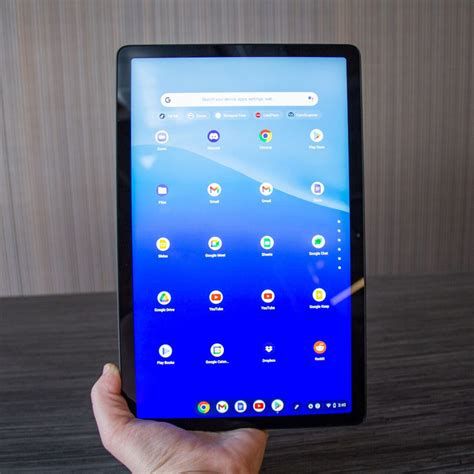
ChromeOS on the Duet 3 felt snappy for everyday activities: web browsing with multiple tabs, Google Docs, streaming, and running a couple of Android apps. Tabs with heavy web apps occasionally felt sluggish if I pushed too many at once, but for typical productivity and media consumption it was reliable.
I ran a Linux container for light development tasks — editing code, running small builds, and using a terminal — and found that the Duet 3 handled these tasks with reasonable patience, though not with the speed of a full-blown developer laptop. If you regularly compile large projects or run heavy containers, this is not the machine for that. But for occasional terminal work and editing it’s quite useful.
Shop the latest Electronics picks on Amazon.
Shop Amazon →Battery life in real-world mixed usage hovered around what I wanted: I routinely got a full workday out of it when I was light on streaming and heavier when I disabled background syncs. On travel days with continuous video and higher brightness the battery dropped faster, but overall I felt confident I could use it for a day of meetings and notes without worrying about the charger.
Connectivity and ports
One of the things I noticed early is the Duet 3's intentionally minimalist port selection. You'll get at least a USB-C for charging and data, and a headphone jack if you still use wired headphones. That means I had to carry a small USB-C hub when I wanted an external monitor, wired ethernet, or a USB-A device. It's a small friction point but an expected trade-off for the small form factor.
Wi-Fi has been stable in my use; I didn't run into weird disconnects or flaky behavior. There's no built-in cellular option in my unit, so if you travel frequently and need always-on connectivity, plan for a phone hotspot or a separate mobile hotspot.
What I liked — and what disappointed me
Here are the concrete things I appreciated and the things that bothered me after living with the Duet 3 for three months.
Pros
- Excellent portability: It's light and compact — perfect when I need to pack minimal gear.
- Sharp, pleasant display: Great for reading, web browsing, and streaming; the brightness helps in brighter rooms.
- Good everyday performance: Snappy for browsing, docs, and Android apps; plenty for most casual users.
- Reliable battery: A full day of typical mixed-use was consistently achievable for me.
- Detachable keyboard that’s usable: Better than many tablet keyboard covers; decent for extended typing sessions.
- ChromeOS simplicity: Fast updates, quick resumes, and sandboxes that made multitasking low-maintenance.
Cons
- Limited ports: You’ll need adapters or a hub for external displays or multiple USB devices.
- Not for heavy workloads: Multi-hour compiles, serious video editing, or heavy containerized workflows will tax it.
- Speakers are weak: They do the job for calls and casual videos but lack depth for music.
- Detachable design has compromises: Typing on a lap is wobblier than a clamshell laptop.
- Keyboard size: The compact layout is mostly fine but can be cramped for users with larger hands.
Comparison: Duet 3 vs other small devices
| Model | Best for | Portability | Performance | Battery | Notes |
|---|---|---|---|---|---|
| Chromebook Duet 3 (2022) | Ultra-portable web-first users | Excellent — very light and compact | Good for browsing, docs, Android apps | All-day mixed use in my testing | Detachable keyboard, minimal ports; solid value for portability |
| Higher-end Chromebook (13" clamshell) | Users who want a more laptop-like experience | Good — slightly heavier | Stronger — better CPUs, more RAM | Varies — generally good | Better for heavier multitasking and a sturdier typing experience |
| Tablet + Keyboard (iPad / Android) | Media consumption, creative apps | Excellent — tablets are very portable | Very good for apps optimized for their OS | Excellent | App ecosystem differs; less laptop-like file handling than ChromeOS |
Use cases where the Duet 3 shined for me
In my workflow the Duet 3 became my go-to for:
- Writing and note-taking: The keyboard and display were comfortable for long-form text.
- Media and travel: Lightweight, easy to prop up on a tray table, and battery life is friendly for flights.
- Casual Android apps and streaming: Apps ran well and the device resumed quickly from sleep.
- Occasional Linux work: Small development tasks and terminal work were feasible without frustration.
When I’d reach for something else
There were times the Duet 3 wasn't the right tool:
- Large-scale development or compiling — I used my main laptop instead.
- Heavy photo/video editing — the screen and CPU are fine for light edits but not for long sessions.
- Audio production — speakers and processing headroom aren't designed for this.
Buying guide — how to choose the right Duet 3 configuration (and what to look for)
If you're considering the Duet 3, here are the practical points I used to decide what to buy and what I wish someone had told me before purchasing.
1. Pick the right RAM for your use
ChromeOS is efficient, but if you like to keep many tabs open or run Linux containers, opt for more RAM. In my testing the more memory helped with tab-heavy sessions and kept background apps responsive. If you're strictly browsing and streaming, a lower RAM variant will be fine.
2. Storage matters more than you'd think
Chromebooks rely on cloud storage, but local storage still matters for Android apps, offline files, and Linux containers. If you plan to keep media or a local project collection, choose a higher storage option or be prepared to use microSD / cloud storage.
Discover deals on Electronics — updated daily.
Browse Now →3. Consider a USB-C hub
Because ports are minimal, a tiny USB-C hub that provides HDMI (or USB-C display), extra USB-A, and an SD card reader will save you time and hassle if you regularly connect to external displays or peripherals.
4. Test the keyboard before committing
If you can, try the keyboard in a store. My hands adapted, but the layout and key size might be a dealbreaker for some. If you type for hours, make sure the feel suits you.
5. Think about audio and webcams
If you rely on built-in speakers for meetings or content creation, the Duet 3 won't replace a dedicated audio setup. Likewise, the webcam is fine for basic video calls — but if you need studio-level video, plan external webcams and mics.
6. Warranty and update expectations
Chromebooks receive automatic updates for several years. Check the specific auto-update expiration date for the model you buy if long-term OS updates are important to you. Also consider extended warranty options if you travel with your device frequently.
Practical tips I picked up during three months of use
- Carry a tiny USB-C hub in your bag — it’s the best accessory investment for this device.
- Use headphone audio for anything with dense sound — the speakers are convenient but not immersive.
- Keep a lightweight sleeve to protect the keyboard and screen from scratches in a crowded bag.
- Use ChromeOS' built-in power and battery settings: lowering background activity when you're off the charger gave me noticeably better endurance on long days.
Final thoughts and who I think should buy it
After three months with the Duet 3, my verdict is straightforward: I enjoyed using it. It did exactly what I bought it for — an ultra-portable, capable secondary machine that I could e-mail, write, read, watch, and do light development on. It felt more like a practical tool than a gimmicky tablet with a keyboard accessory.
That said, the Duet 3 isn't for everyone. If you frequently need raw CPU power, lots of ports, or a desk-bound workstation-level machine, you'll want a different class of laptop. But if your days are mostly web-first productivity, reading, streaming, and occasional light creative work, I think the Duet 3 is a great fit. For me, the convenience of a light device that opens quickly, sleeps instantly, and fits into any small bag made it an easy daily driver for three months in.
Ultimately, if portability and a pleasant, fuss-free ChromeOS experience are high on your priorities, the Chromebook Duet 3 (2022) delivered on that promise for me — with the usual trade-offs that come with such a compact, detachable design. I still reach for it when I need something effortless to carry and reliably productive, and that consistency is why it stayed in my bag long after the first week.