Don't Buy the Chromebook Flex 5 2020 Until You Read This Full Analysis
The landscape of the ChromeOS market underwent a significant shift around 2020. Before this era, buyers were often forced into a binary choice: settle for a "budget" device with a dim screen and a plastic chassis that felt like a toy, or spend nearly a thousand dollars on a premium Google Pixelbook or a high-end Samsung offering. The Chromebook Flex 5 2020 arrived as a strategic middle ground, aiming to offer the "Goldilocks" experience—just enough power, a versatile form factor, and a price tag that didn’t induce sticker shock. However, as this device enters the legacy phase of its lifecycle, there are critical nuances regarding its build quality, long-term software support, and hardware limitations that prospective second-hand buyers or warehouse-stock hunters must understand before committing.
The Evolution of the Mid-Range Chromebook
To understand why the Flex 5 2020 was such a pivotal release, one must look at the hardware specifications that were standard at the time. Lenovo integrated a 10th Generation Intel Core i3 processor into a 13-inch chassis, which was a massive leap over the Celeron and Pentium chips usually found at its price point. It heralded an era where web applications, Linux containers, and Android apps could finally run simultaneously without the "stuttering" that characterized earlier ChromeOS hardware. Yet, the very things that made it a "prosumer" bargain in 2020 are the same areas where the seams are beginning to show in 2024 and beyond.
Detailed Product Analysis: Hardware and Performance
The Processor and Multitasking Efficiency
At the heart of this specific model is the Intel Core i3-10110U. While "Core i3" might sound basic to Windows users, in the world of ChromeOS, it remains a capable workhorse for productivity. This processor handles thirty or forty open Chrome tabs with ease, provided the user isn't running heavy video editing software in the background. For the student writing a thesis with twenty research tabs, a Spotify window, and a Google Meet call active, the Flex 5 2020 delivers a level of fluid responsiveness that cheaper MediaTek-based laptops cannot match. However, the 4GB of RAM found in many base configurations of this model acts as a significant bottleneck. Modern ChromeOS updates have become more resource-heavy, and 4GB is increasingly the absolute minimum for a smooth experience.
Chassis Design and 2-in-1 Versatility
Lenovo utilized a blend of materials for the Flex 5. The top lid is aluminum, providing a premium feel when carrying the device, while the bottom deck is a high-quality salted-texture plastic. This hybrid approach keeps the weight down to approximately 2.97 pounds, making it an excellent companion for commuters. The "Flex" moniker denotes its 360-degree hinge, allowing it to transition from a traditional laptop to a tent mode for watching movies, or a tablet mode for reading. While the hinges are stiff enough to prevent screen wobble during typing, there have been documented reports regarding the long-term durability of the hinge-to-screen mounts, a common point of failure in thin-and-light convertibles from this era.
The Display Experience
The 13.3-inch Full HD (1920 x 1080) IPS touch display is one of the strongest selling points, though it comes with a caveat. The color reproduction is vibrant enough for casual media consumption and document work. Unlike the TN panels found in entry-level education models, the IPS technology here ensures that colors don't wash out when viewing the screen from an angle. However, the peak brightness is rated at around 250 nits. This is perfectly adequate for a dorm room, a home office, or a coffee shop, but it is virtually unusable outdoors or in a sun-drenched conservatory. The glossy finish, necessary for the touchscreen functionality, also introduces significant reflections in high-glare environments.
Keyboard, Trackpad, and Audio
Lenovo is widely regarded for its keyboard engineering, and the Flex 5 2020 inherits some of that DNA. The keys have a slightly cupped shape and 1.4mm of travel, providing a tactile "click" that makes long-form writing pleasant. It is also backlit, a feature that was often stripped from mid-range laptops in 2020. The trackpad is of the Mylar variety—not glass—but it tracks accurately and supports all the standard ChromeOS gestures. A standout feature is the user-facing speakers located on either side of the keyboard. Most Chromebooks hide speakers on the bottom, resulting in muffled sound. On the Flex 5, the audio is directed toward the user, providing clear dialogue for video calls and a decent, albeit bass-light, experience for streaming music.
Pros and Cons
- Pro: Core i3 Performance - Offers a much faster experience than Celeron-powered alternatives, allowing for better multitasking and longer relevance.
- Pro: Port Selection - Includes two USB-C ports (both support charging and DisplayPort), a USB-A port for older peripherals, a microSD card reader, and a headphone jack.
- Pro: Physical Privacy Shutter - A sliding physical cover for the webcam provides peace of mind for privacy-conscious users without needing unsightly tape.
- Pro: Wi-Fi 6 Support - This was one of the early Chromebooks to include Wi-Fi 6, ensuring better connectivity and faster speeds on modern routers.
- Con: Battery Life Consistency - While rated for 10 hours, real-world usage with high brightness and multiple apps usually results in 6 to 7 hours, which may not last a full workday.
- Con: Hinge Durability Concerns - Some users have reported the plastic surrounding the hinge can crack over years of heavy "flexing" between modes.
- Con: 250-Nit Brightness - The screen is dim compared to modern premium standards, making it difficult to use in bright environments.
- Con: Auto Update Expiration (AUE) - As a 2020 model, its "shelf life" for official Google software and security updates is shorter than newly released models.
Technical Specifications Comparison
To see how the Flex 5 2020 stands against its contemporaries and the entry-level education models it was competing with, consider the following data:
Discover deals on Electronics — updated daily.
See Deals →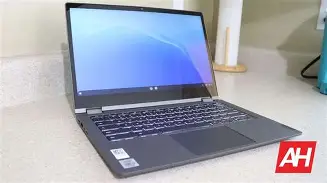
| Feature | Chromebook Flex 5 (2020) | Typical Budget Chromebook (2020) | Premium Chromebook (2020) |
|---|---|---|---|
| Processor | Intel Core i3-10110U | Intel Celeron N4020 | Intel Core i5-10210U |
| RAM | 4GB / 8GB DDR4 | 4GB LPDDR4 | 8GB / 16GB LPDDR4x |
| Storage | 64GB / 128GB NVMe SSD | 32GB / 64GB eMMC | 128GB+ NVMe SSD |
| Display | 13.3" FHD IPS Touch (250 nits) | 11.6" HD TN Non-Touch | 13.3" 4K or QHD (400+ nits) |
| Build Material | Aluminum Lid / Plastic Base | All Plastic | Full Aluminum or Magnesium |
| Weight | 2.97 lbs | 2.6 - 3.2 lbs | 2.3 - 2.7 lbs |
The Buying Guide: Is It Still Relevant?
Buying a piece of technology that is several years old requires a different set of priorities than buying the latest release. If you are considering the Chromebook Flex 5 2020 today, you must evaluate it through the lens of longevity and specific use cases.
Check the Auto Update Expiration (AUE)
Google provides a guaranteed "death date" for every Chromebook, after which the device no longer receives security patches or new versions of ChromeOS. The Flex 5 2020 was originally slated for a shorter life, but Google has since extended the update policy for many 10th Gen Intel devices. Currently, most models in this family are supported until June 2028 or later. If you are buying this in 2024 or 2025, you still have several years of secure use, but you should always verify the specific AUE in the ChromeOS settings menu before purchasing a used unit.
The 4GB vs. 8GB Debate
In 2020, 4GB of RAM was standard. Today, it is barely enough. If you find a refurbished model with 8GB of RAM, it is worth a significant premium. The Linux development environment and Android apps (like Slack, Microsoft Word, or heavy PDF readers) consume memory quickly. Users who intend to use the Flex 5 for more than just basic web browsing should prioritize the 8GB configuration to avoid the "tab discarding" behavior where Chrome closes your inactive tabs to save memory.
Storage Speed Matters
One hidden advantage of the Flex 5 2020 is that it uses an NVMe SSD rather than the slower eMMC storage found in budget laptops. This means the device boots in seconds, apps launch nearly instantaneously, and system updates are applied much faster. When comparing this to a newer but "cheaper" laptop, don't just look at the storage size (64GB or 128GB); the underlying technology (NVMe) makes a tangible difference in daily use.
Real-World Use Cases
Who is this laptop actually for in the current market? It is an ideal secondary device for the home. It is perfect for managing a household budget, recipe browsing in the kitchen (where the tent mode is useful), or for a student who needs a distraction-free writing tool that can also handle research. It is less suitable for "digital nomads" who work in varied lighting conditions or for professional creators who need color-accurate displays for photo editing.
Understanding the Maintenance and Longevity
Because the Chromebook Flex 5 2020 has been in the wild for years, we have a wealth of data on how it ages. The battery is a consumable part; a used unit may only hold 80% of its original capacity. Fortunately, because this was a popular model, replacement batteries are relatively easy to find on the secondary market. The keyboard and trackpad have proven to be resilient, but the soft-touch coating on the plastic palm rest can sometimes show "shine" or wear after years of contact with the oils from a user's skin.
Discover deals on Electronics — updated daily.
View Offers →The internal cooling fan is another consideration. Unlike lower-powered Chromebooks that are fanless and silent, the Core i3 in the Flex 5 requires active cooling. Under heavy loads, you will hear a slight whirring. Over time, dust can accumulate in the vents. A simple blast of compressed air every few months can prevent the thermal throttling that might otherwise slow down the system.
Final Verdict: To Buy or Not to Buy?
The Lenovo Chromebook Flex 5 2020 was a landmark device that proved consumers didn't have to spend a fortune to get a "real" laptop experience on ChromeOS. It corrected the biggest flaws of the budget category by providing a backlit keyboard, a 1080p IPS screen, and a powerful Intel Core processor. However, it is not a "blind buy" in the current year. The 250-nit screen brightness is a genuine hurdle for anyone who doesn't work in a controlled lighting environment, and the 4GB RAM limitation on many units will frustrate power users.
If you find this device at a deep discount—perhaps as a refurbished unit or a steady second-hand find—and your needs involve moderate web browsing, streaming, and document creation, it remains a fantastic value proposition. It offers a level of refinement in its keyboard and speaker layout that many brand-new $300 laptops still fail to achieve. However, if you are looking for a primary machine to last you the next five to seven years, you may want to look toward the newer iterations, such as the Flex 5i, which offer improved battery efficiency, brighter screens, and longer software support windows. The Flex 5 2020 is a classic, but it is a classic that requires a discerning eye before you sign on the dotted line.
In conclusion, the Flex 5 2020 stands as a testament to the "mid-range" ideal. It isn't perfect, but for the right user—one who understands its thermal profile, its screen limitations, and its memory ceilings—it remains one of the most balanced 2-in-1 experiences ever released in its price bracket. Just ensure you are buying it for what it is: a highly capable, slightly aged workhorse that excels in the classroom and the living room, but struggles under the midday sun.